

4.2 KO at the search interface
4.2.1 The role of the search interface
Is it enough to use a high-quality KOS? It is at the search interface where KOS becomes useful for the end user. This is why good search interfaces are indispensable in making KOS useful to help the user disambiguate homonyms, select more specific terms, select related terms, or subject browse through the collection.
|
|

MAKING COLLECTIONS VISIBLE
Hidden collections are collections that are not discoverable by scholarly users working within the relevant subject domains, either through digital or analog means (CLIR 2014)
As written in earlier lessons, providing quality subject access to a vast range of heterogeneous information objects in digital collections is essential to make them visible. This includes primary (e.g. research objects) and secondary sources (e.g. publications). The general objective of subject indexing should be that it allows the user to find everything in the collection that is relevant to a particular topic. KOS need to be applied to help address challenges of the natural language in subject searching and the scarce text of information objects (like museum objects). While international standards, policies and practices to support this are in place, the next question is to what degree the benefits of KOS are taken at the level of the search interface -- it is only then that the KOS become useful for the end user.
SUBJECT SEARCH FUNCTIONALITIES ON INTERFACE
Literature has pointed to 18 functionalities common across cultural heritage institutions and three additional image-related ones important for collections with images and information objects other than publications (Golub et al. 2021). While more research involving users is needed to confirm the best ways to implement different functionalities, let us consider the suggested functionalities.
Most functionalities are related to KOS-based searching. These include:
1. Searching by concepts from KOS
This includes searching by entire subject index terms and individual concepts from a subject index term, including unique facets or concepts that compose a complex term, as in subject headings or classes. This allows searching by final and completes built classes or pre-coordinated index terms and in-built facets of the classes or index terms. Furthermore, this means that the user can search by a term rather than just a symbol of the class (the end user should not be expected to use class symbols). For example, this means that a work indexed with LCSH subject heading Television series--History and criticism should be searchable by its individual concepts, i.e. Television series, History and criticism. Or,
2. Browsing by concepts from KOS
Hierarchical or tree-type browsing of themes covered in a collection of information resources is especially useful for those new to the document collection. Hierarchically structured concept schemes, such as hierarchical classification systems or information retrieval thesauri, are most beneficial. At the narrowest hierarchical levels, there should be a manageable number of information resources -- perhaps not more than several dozen or so. If there are many more, the structure should be further developed to include narrower concepts.
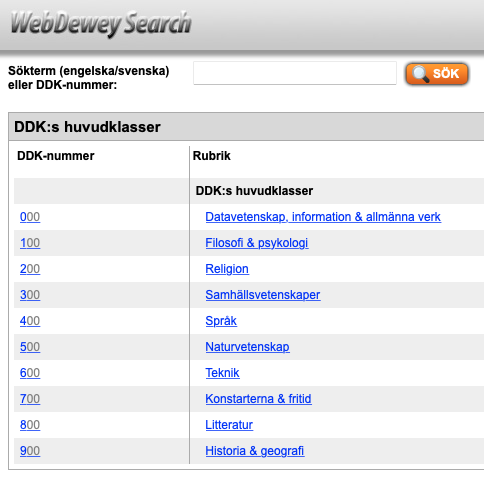 Hierarchical subject browsing of the Swedish DDC classification system. Clicking on each of the ten main classes will give the list of narrower classes in turn, and so on. Each class is linked to a list of information resources used to index. Hierarchical subject browsing of the Swedish DDC classification system. Clicking on each of the ten main classes will give the list of narrower classes in turn, and so on. Each class is linked to a list of information resources used to index. |
3. Automatic translation of user search terms into KOS terms
If the user writes a synonym not used in the KOS per se, the system should automatically translate the user terms into its preferred term, denoting the same concept. The system resorts to the KOS to be able to do that.4. Showing narrower terms and broader terms
When the user types a search term, narrower and broader terms are shown for the user to explore and consider choosing a more specific or general term. It also helps the user with disambiguation.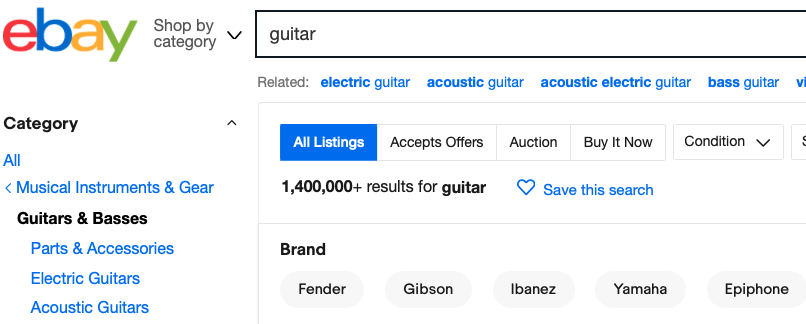 The search interface of Ebay (https://www.ebay.com/). When entering the term' guitar', the interface helps the user narrow it down to a specific type like acoustic, electric, etc. (narrower term). It provides an excerpt from the classification tree to find related terms and disambiguate further. The search interface of Ebay (https://www.ebay.com/). When entering the term' guitar', the interface helps the user narrow it down to a specific type like acoustic, electric, etc. (narrower term). It provides an excerpt from the classification tree to find related terms and disambiguate further. |
5. Disambiguation
Disambiguation allows the user to choose the wanted meaning of the term, e.g., are you looking for a jaguar as an animal or a jaguar as a car? If you search for jaguar on Google, it will first retrieve results for jaguar as a car, but on the right side of the screen, it will allow the option to see results about jaguar the animal.
The literature also points to image-related search functionalities. These include searching by image-related characteristics, such as size or orientation (portrait/landscape) and by features enabled by IIIF (e.g. deep Zoom viewing). Also very useful are content-based image retrieval (CBIR) methods, such as query by example image, also available in Google's image search.
This example from Europeana shows the combination of textual search criteria ("painting"), the providing country (Sweden), the licence type (free reuse) and a query by colour (red and green). |
Other functionalities from the literature also point to the need to link all metadata records with the same subject index term. This would allow the user to click on the term in a relevant metadata record and directly retrieve all other metadata records with the same term. Some functionalities reflect the need to complement KOS with other KOS, such as end-user tags, to support end-user perspectives and the inclusion of the most current terms from the literature. Further, it is important to conduct mapping between the different KOS to support cross-collection searching, whereby collections are indexed using different KOS.
Some functionalities are less based on KOS but are important for the user, such as autocompletion and autocorrection; they speed up the typing and correct mistypes, enhancing retrieval. Also, highlighting the search term(s) in the retrieved results helps the user quickly identify the context in which their search term(s) were found. Finally, functionalities often seen in advanced search interfaces support more complex information needs, such as those of researchers who may need to combine several search terms and resort to Boolean or proximity operators, stemming, truncation, wildcards and similar. Combining previous search formulations may also be helpful.
Now, why not test your knowledge of search functionalities with the following quiz:
REFERENCES
- The Council on Library and Information Resources (CLIR). (2014). Request for Proposals for the Cataloging Hidden Special Collections and Archives Program. Available at: https://www.clir.org/2014/01/call-for-proposals-cataloging-hidden-special-collections-and-archives-program/
- Golub, K., Ziolkowski, P. M., & Zlodi, G. (2022). Organizing subject access to cultural heritage in Swedish online museums. Journal of Documentation, 78(7), 211–247. https://doi.org/10.1108/jd-05-2021-0094