

XML: Building Blocks and Basic Rules
Elements
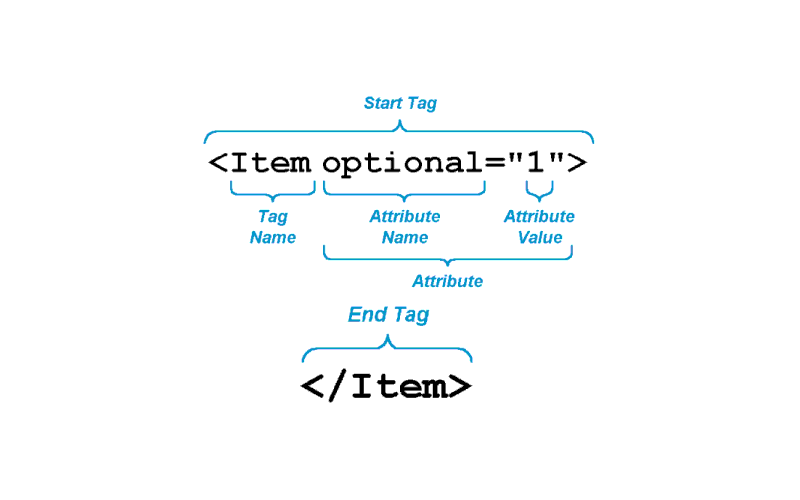
Elements and attributes are like apples and oranges
Within an XML document, data is contained within elements. Elements have a start-tag and an end-tag. Start and end tags consist of an element name, which is a string of text such as 'lexicographer', and a delimiter indicating the beginning and end of a tag. XML tags are delimited from the stored "raw" data by use of angle brackets. The left angle bracket < is used to indicate the beginning of an XML tag, whereas the right angle bracket > is used to indicate the end of a tag.
As we mentioned earlier on, the only difference between a start tag and and end tag is the use of a slash. The following would be an example of an XML element describing a person by his profession. The content of the element, or in XML parlance, PCDATA (Parsed Character Data) 'Samuel Johnson' appears between the start- and end-tags:
<lexicographer>Samuel Johnson</lexicographer>
A special case are so-called empty elements. Empty elements do not contain PCDATA, and one tag functions as both the start and end tag. Empty elements are typically used as milestones. The XHTML element <br/> which indicates line breaks would be typical of this. This structure is frequently necessary to indicate where breaks occur in a source text (e.g. a page or section break in a book or an article).
Rules for element names
XML element names:
- must start with a letter or underscore
- can contain letters, digits, hyphens, underscores and periods
- are case-sensitive.
The following table shows examples of valid XML names:
| Example | Why is it valid? |
|---|---|
<_newElement> </newElement> |
Element names must start with a letter or underscore |
<newElement> </newElement> |
Element names are case-sensitive, start and end tag have to match |
<my.new_Element-1></my.new_Element-1> |
Element names can contain letters, digits, hyphens, underscores and periods |
Invalid element names lead to XML documents that are not well-formed. An XML processor will not process the data, but instead indicate an error message. The following table shows examples of illegal XML element names:
| Example | Why is it illegal? |
|---|---|
<1Element> </1Element> |
Element names cannot start with a digit, hyphen or period |
< Element /> </ Element> |
Element names cannot start with an initial space |
<newElement> </Newelement> |
Element names are case-sensitive and start and end tag must match |
<xmlElement></xmlElement> |
Element names cannot start with the string xml, XML, Xml, etc |
<new Element> </new Element> |
Element names cannot contain whitespace |