Modelling with XML
XML and its advantages
The Extensible Markup Language (or XML) is a specification of the World Wide Web Consortium (W3C). As discussed in the last unit, XML is a metalanguage and can be used to describe custom markup languages that conform to the basic rules of XML. The entire XML specification can be found on the W3C website at https://www.w3.org/XML/
Today XML is used in the world of technology and in particular on the Internet. For instance, XML-based markup languages such as XHTML, an XML version of HTML, SVG, a standard to describe graphics, and RDF, a standard that is central to the semantic web, are central to the Internet today. Since 2004 also TEI, the encoding recommendations of the Text Encoding Initiative, uses XML. XML was originally developed as a standard for data exchange over the web and its main advantages are that it is a device independent standard, that it is machine and human readable, and that XML promotes a clear separation between data and presentation.
XML is device independent
One of the main advantages of XML is its high degree of interoperability. XML data can be used by different programmes on different platforms. XML files are simple text files and are not platform or software dependent. Consequently, an XML document can be written on a Mac, stored on a Linux server and downloaded to a Windows PC. All these operating systems are able to read an XML file. At the same time, XML can be used to exchange data between different programmes. For instance, since Microsoft Word introduced its xml-based document format, Word documents can be viewed and edited by other software such as LibreOffice.
XML is machine and human readable
Another advantage of XML is that it can be written, read and altered by humans as well as computers. No special software is required to access the data in XML documents. A simple text editor such as Notepad, Vi or TextEdit can be used to open and edit XML documents.
For instance, before Microsoft Word used XML it was very difficult to rescue your data from a corrupted Word document. Now, XML content of a Microsoft document can easily be extracted and viewed with a simple text editor. The following video will show you how you can open a Microsoft Word document and read its XML content. Try to follow it on your own computer and stop the video if necessary. Instead of a Microsoft Word document, you could also try the exercise with a LibreOffice document.
XML promotes a clear separation of data and presentation
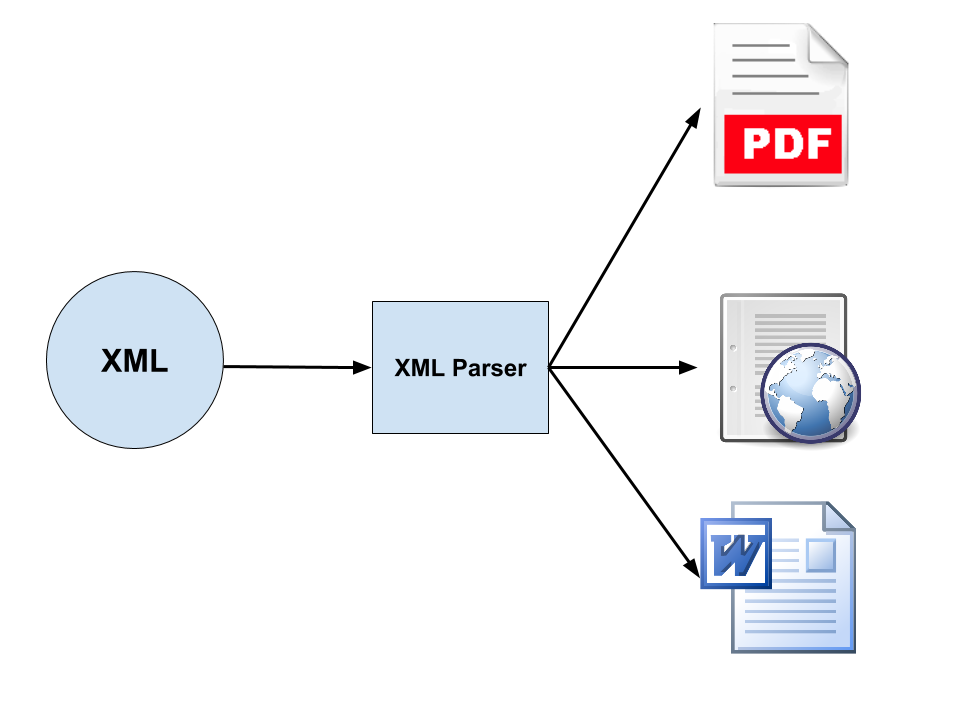
The third major advantage of XML documents is that XML promotes a clear separation of data and presentation. This enables the possiblity that XML encoded data can be exchanged without presentational information attached. On the one hand this reduces file size overhead and is an advantage for the exchange of huge amounts of data over networks, on the other hand it allows for the presentation of the same data in different formats. Using an XML parser, a software developed to access and manipulate XML documents, the same underlying data can be used in multiple and very different presentation scenarios and the same XML document can be convert to a PDF, a Microsoft Word document and a web page as per the image below.
|
|